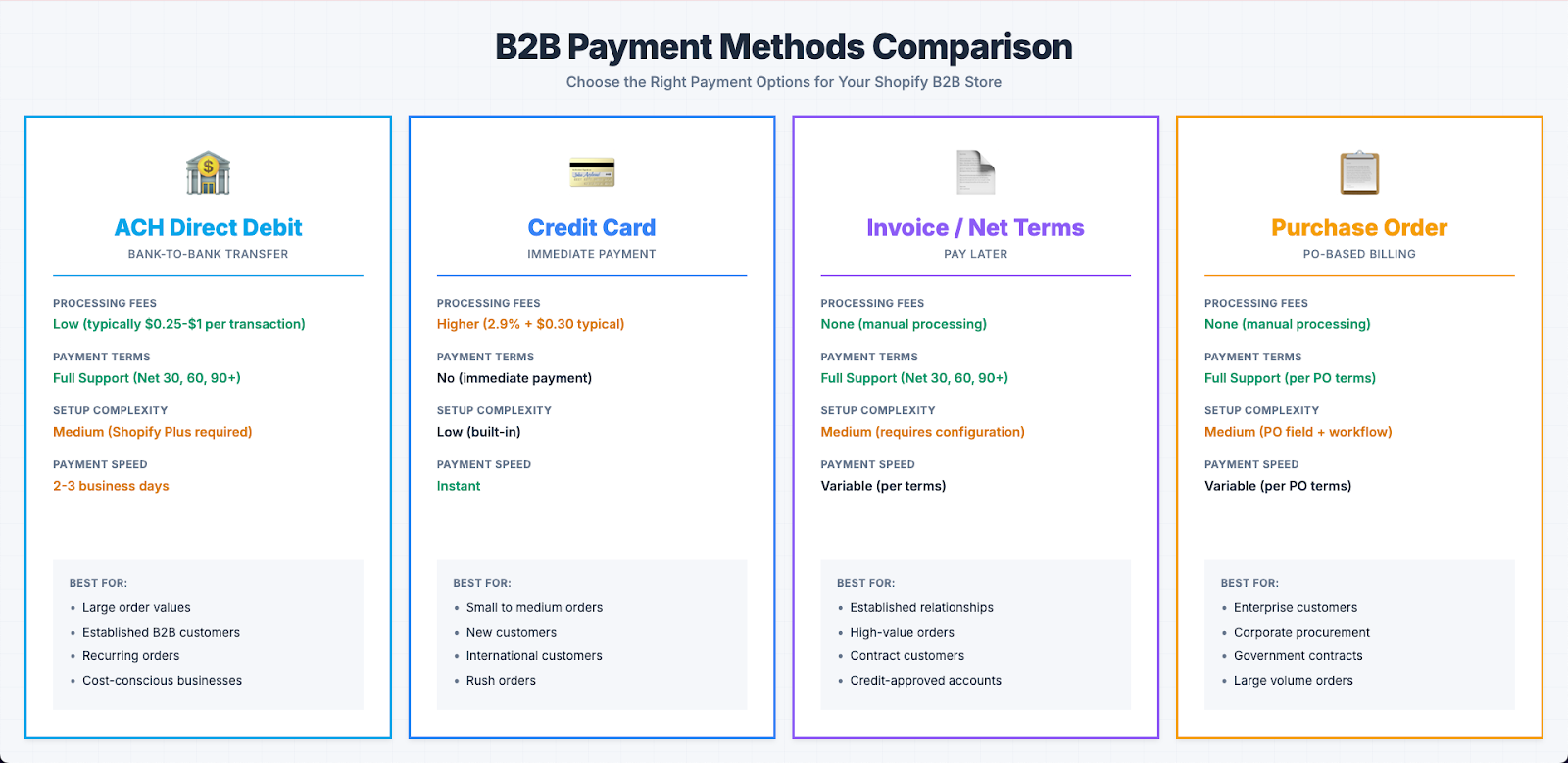
B2B customers have different payment needs than B2C shoppers. They often use purchase orders, net terms, ACH payments, and invoice billing instead of credit cards. Choosing the right payment options for your B2B customers affects cash flow, customer satisfaction, and order conversion. Shopify offers several payment methods that work well for manufacturing and wholesale businesses.
Understanding B2B Payment Needs
B2B customers typically need:
Payment Terms
Most B2B transactions use payment terms (net 30, net 60, etc.) rather than immediate payment. Customers expect to receive goods and pay later according to agreed terms.
Lower Processing Fees
B2B orders are often large, so processing fees matter. ACH payments typically have lower fees than credit cards, making them attractive for high-value orders.
Purchase Order Support
Many B2B customers use purchase orders. They need to be able to reference PO numbers and pay against invoices later.
Multiple Payment Methods
Different customers prefer different methods:
Some want to pay immediately with credit cards
Others need net terms and invoice billing
Some prefer ACH for lower fees
Large customers may have specific payment requirements
Shopify’s Native Payment Options
Shopify provides several payment options out of the box:
Credit Cards
Shopify Payments and other gateways support credit card processing. This works for:
Immediate payment
Customers who prefer credit cards
Smaller orders
International customers
ACH Direct Debit
Shopify Payments supports ACH Direct Debit as a local payment method for B2B customers. This allows:
Direct bank account payments
Lower processing fees than credit cards
Payment terms integration (net 30, net 60, etc.)
Automated collection on due dates
Secure bank account authentication during checkout
Manual Payment Methods
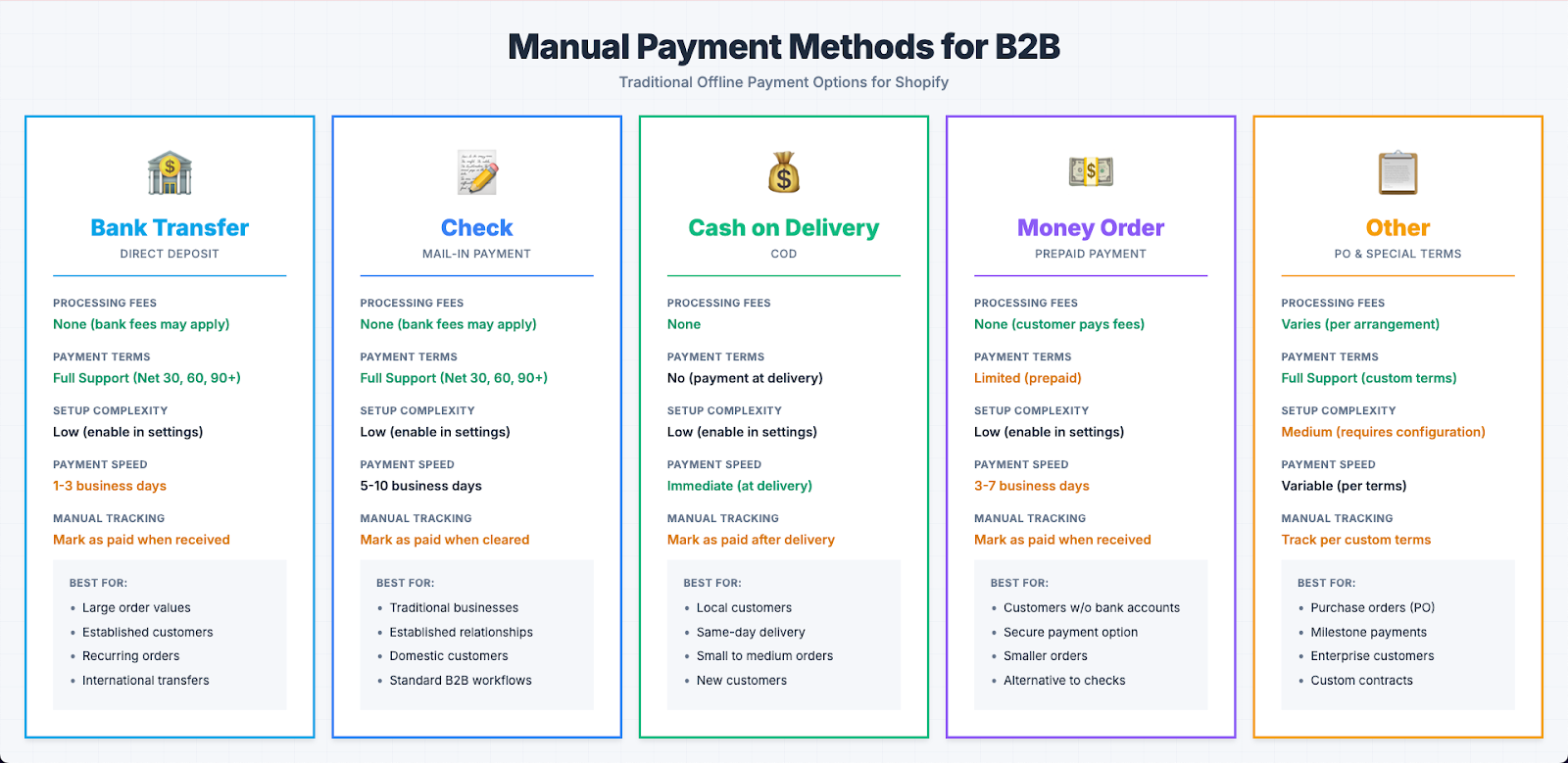
Shopify supports manual payment methods for traditional offline payments. These include:
Bank transfers
Checks
Cash on delivery
Money orders
Other custom offline payment arrangements
With manual payments, customers place orders and you manually mark them as paid in Shopify admin after receiving payment offline.
Buy Now, Pay Later
Some B2B customers use BNPL options, though this is less common in B2B than B2C.
ACH Direct Debit for B2B
ACH Direct Debit is one of the most important payment options for B2B businesses. It’s a local payment method available through Shopify Payments that allows customers to pay directly from their bank accounts.
Benefits
Lower fees: ACH typically costs less than credit card processing
Better for large orders: Fee savings are significant on high-value transactions
Payment terms support: Works seamlessly with net terms (net 30, net 60, etc.) and invoice billing
Automated collection: Automatically collects payment on due dates based on payment terms
Secure authentication: Customers securely authenticate and link their bank accounts during checkout
Saved payment method: Bank account information can be saved for future orders
How It Works
Customer selects ACH Direct Debit as payment method during checkout
Customer authenticates and links their bank account securely (using Plaid or similar verification)
Bank account is verified and saved
Order is placed (payment isn’t collected immediately if payment terms are configured)
On the due date (based on payment terms), Shopify automatically collects payment via ACH
Customer’s bank account is debited
Payment confirmation is sent to both merchant and customer
Setup Requirements
To offer ACH Direct Debit:
You need Shopify Payments enabled
You must be located in the US (merchant requirement)
Customers must be in the US (currently)
You need to configure payment terms for B2B customers (if using deferred payment)
Your bank account must be verified in Shopify (for receiving ACH payments)
How to Enable ACH Direct Debit
Go to Settings > Payments in your Shopify admin
Click “Manage payment methods” (if using Shopify Payments)
Scroll to “Local payment methods” section
Enable “ACH Direct Debit”
Configure settings as needed
Test the checkout flow to ensure it appears for B2B customers
Bank Account Verification
For merchants receiving ACH payments:
You’ll need to add and verify your bank account in Shopify
Go to Settings > Billing > Payment methods
Add your bank account details
Complete the verification process (typically involves micro-deposits)
Once verified, you can receive ACH payments
Customer Experience
Customers see ACH Direct Debit as a payment option during checkout. The process:
Customer selects ACH Direct Debit
They’re prompted to authenticate their bank account (secure connection)
Bank account is linked and verified
If payment terms are configured, payment is scheduled for the due date
If no payment terms, payment may be collected immediately or according to your settings
Customer receives confirmation and can view payment schedule in their account
Credit Card Payments
Credit cards still have a place in B2B:
When to Offer Credit Cards
Small orders where convenience matters
International customers
Customers who prefer immediate payment
Emergency or rush orders
Customers without established credit terms
Considerations
Higher processing fees (especially on large orders)
Immediate payment (no payment terms)
International acceptance
Chargeback risk
Optimizing Credit Card Usage
For B2B businesses:
Consider passing processing fees to customers (if allowed)
Set minimum order values for credit card acceptance
Use credit cards as a backup option
Consider surcharges for credit card payments
Manual Payment Methods
Manual payment methods allow B2B customers to pay using traditional offline methods. This is essential for businesses that accept bank transfers, checks, or other non-automated payment methods.
What Are Manual Payments?
Manual payments in Shopify are payment methods where:
Customers place orders online
Payment is received offline (bank transfer, check, cash, etc.)
You manually mark the order as paid in Shopify admin after receiving payment
No automatic payment processing occurs
Common Manual Payment Methods
Bank Transfer
Customers transfer funds directly to your bank account
You receive payment confirmation from your bank
Mark order as paid once funds are received
Check
Customers mail checks for orders
You process checks through your normal banking
Mark order as paid when check clears
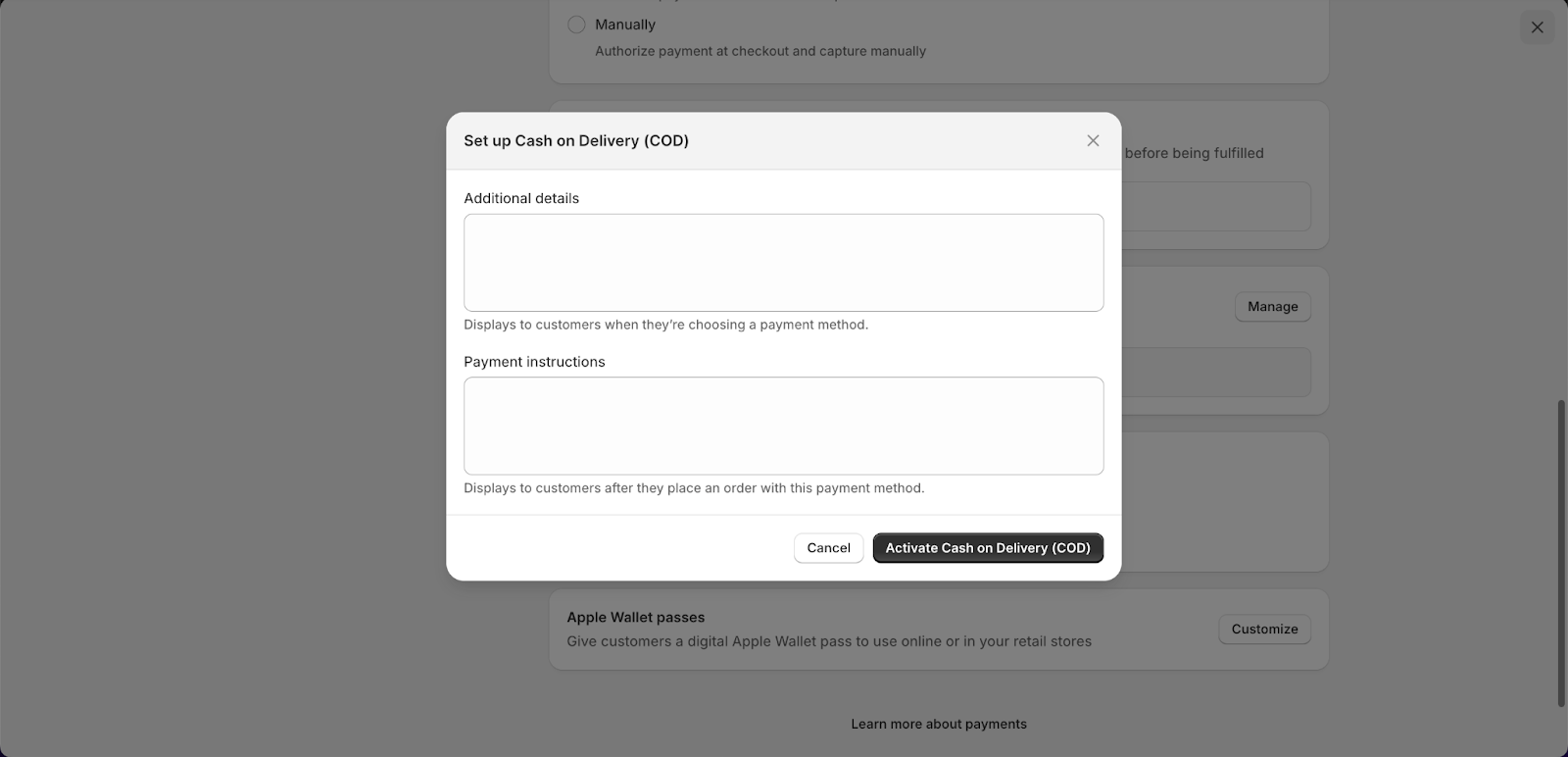
Cash on Delivery (COD)
Payment collected when order is delivered
Common for local B2B customers
Mark order as paid after delivery
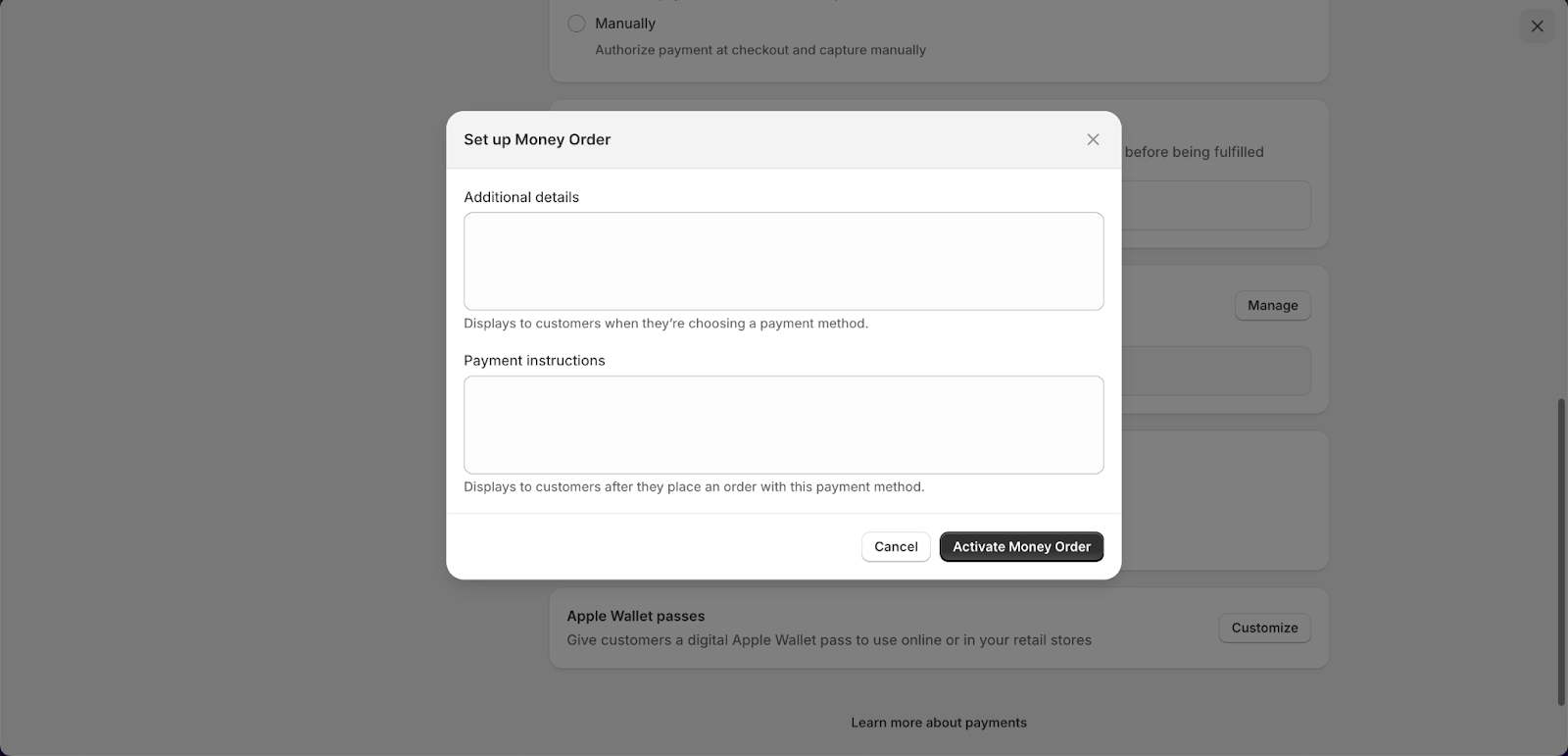
Money Order
Customers send money orders
Process like checks
Mark as paid when received
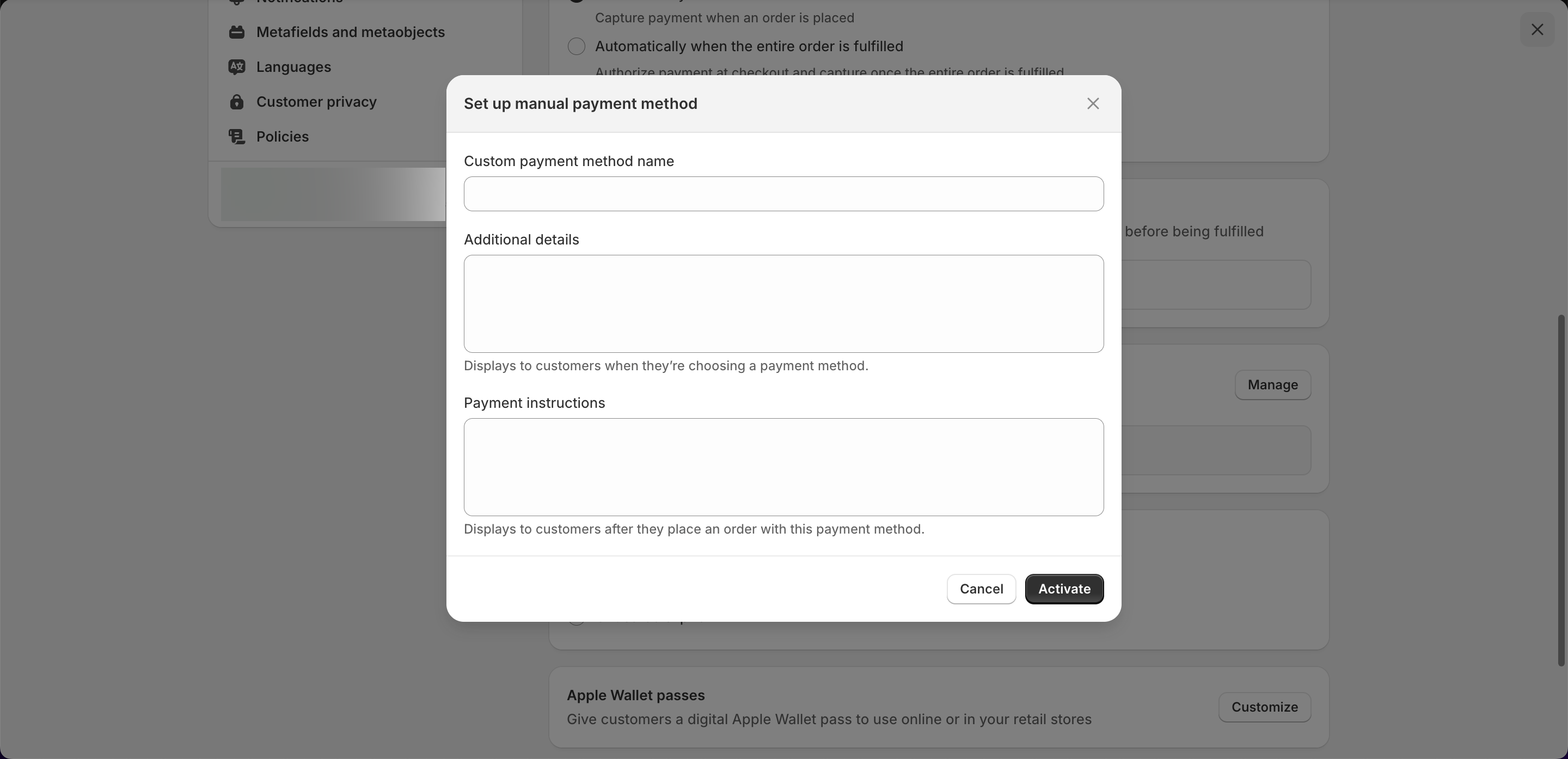
Custom Payment Arrangements
Purchase orders (PO numbers)
Custom payment schedules
Milestone payments
Other unique arrangements
How Manual Payments Work
Customer selects a manual payment method at checkout
Order is placed (status: pending payment)
Customer pays you offline using the selected method
You receive payment confirmation
You manually mark the order as paid in Shopify admin
Order status updates to paid, and fulfillment can proceed
Setup
To configure manual payment methods in Shopify:
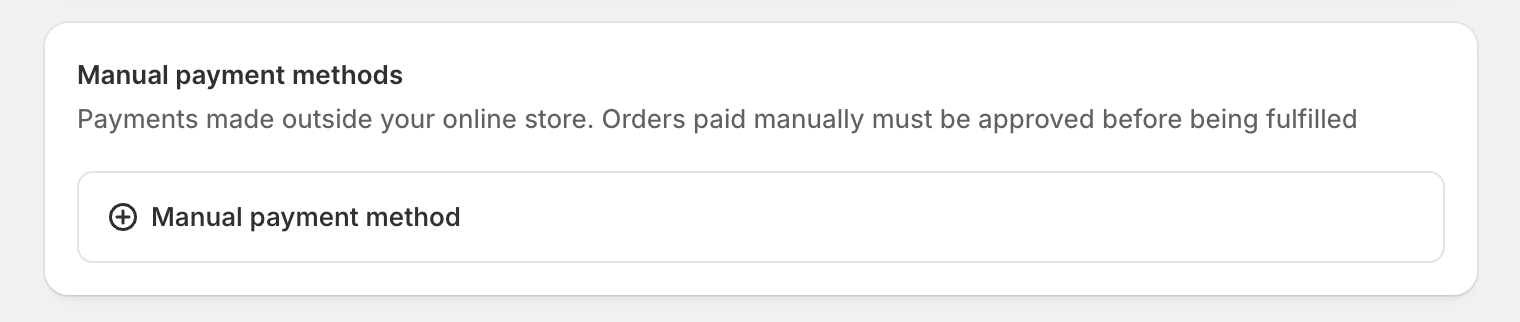
Go to Settings > Payments
Scroll to “Manual payment methods”
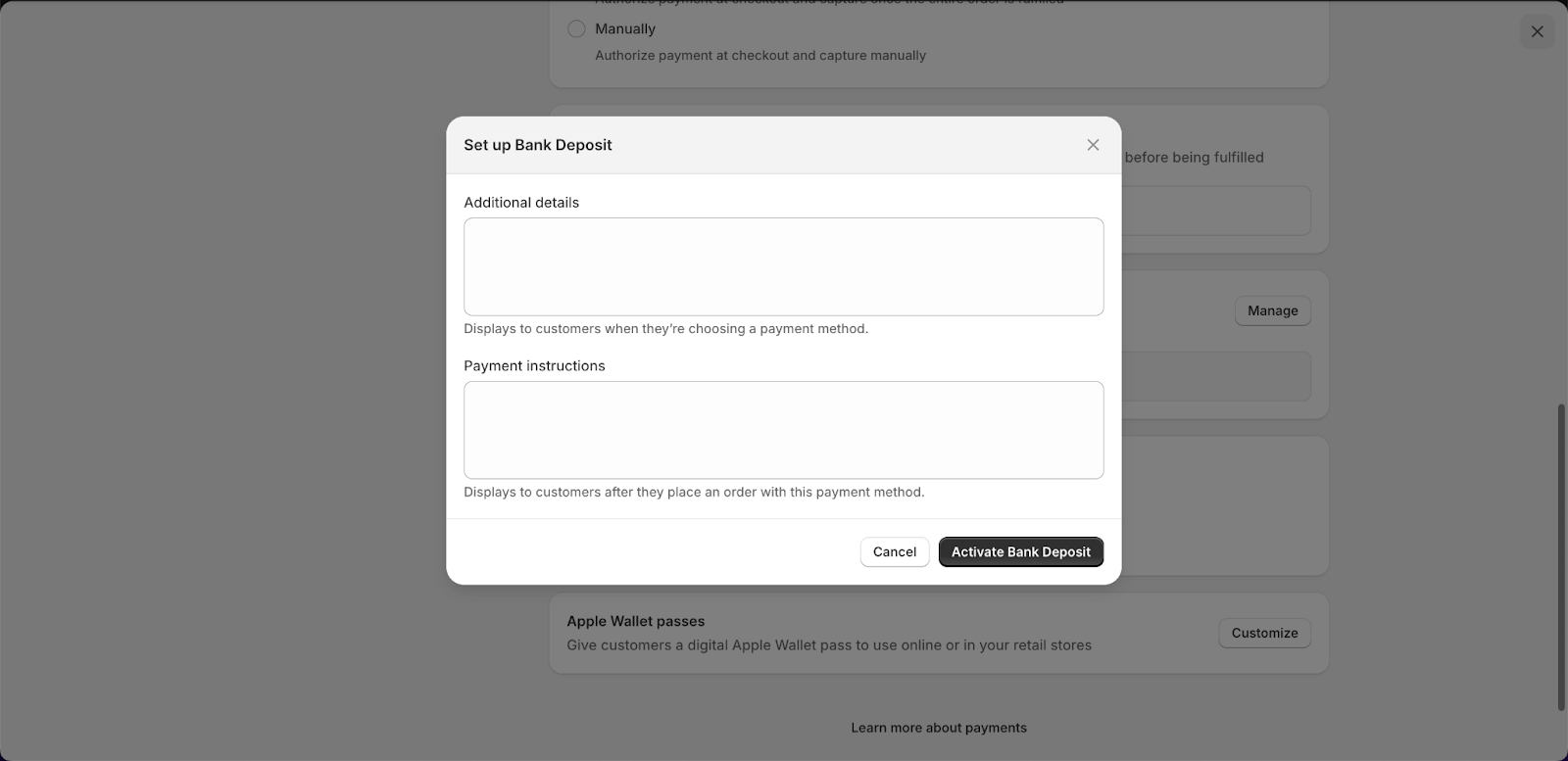
Enable the methods you want to offer:
Bank deposit
Cash on delivery (COD)
3. Money order
Custom payment method (create your own)
Add payment instructions for each method
Configure which methods to show to customers
When to Use Manual Payments
Manual payments work well for:
Customers who prefer traditional payment methods
Large orders where bank transfers are standard
Purchase order workflows
Customers with established relationships
Local customers who can pay on delivery
Custom payment arrangements
Manual Payments vs. Payment Terms
It’s important to understand the difference:
Manual payments: Offline payment methods (bank transfer, check, etc.) that you mark as paid manually
Payment terms: Time-based payment arrangements (net 30, net 60) that can work with ACH Direct Debit or manual payments
You can combine both: offer manual payment methods (like bank transfer) with payment terms (net 30), so customers place orders, receive invoices, and pay via bank transfer within the agreed timeframe.
Important Considerations
Payment tracking: You must manually track and record payments
Order fulfillment: Orders remain pending until you mark them as paid
Payment terms integration: Manual payments can work with payment terms, but you’ll need to track due dates and mark payments manually
Accounting integration: Ensure your accounting system can handle manual payment reconciliation
Customer communication: Clearly communicate payment instructions, due dates, and expectations
Buy Now, Pay Later Options
BNPL is less common in B2B but can be useful:
When It Makes Sense
Smaller B2B customers who want flexibility
Customers without established credit
Seasonal businesses with cash flow needs
Customers who prefer installment payments
Considerations
May not support payment terms
Fees may be higher than ACH
Less common in B2B than B2C
Customer education may be needed
Payment Terms and Net Terms
Payment terms are critical for B2B:
Setting Up Payment Terms
In Shopify Plus:
Assign terms to customer segments
Set default terms for new customers
Customize terms per customer if needed
How Terms Work
Customer places order
Order is fulfilled
Invoice is generated
Payment is due according to terms
ACH or other collection happens on due date
Customer-Specific Terms
Different customers may have different terms:
Large customers: Net 60 or longer
Standard customers: Net 30
New customers: Net 15 or immediate payment
VIP customers: Custom terms
Choosing the Right Mix
For manufacturing and B2B businesses, offer multiple options:
Essential Options
ACH Direct Debit: For customers with payment terms (automated collection)
Manual Payment Methods: For bank transfers, checks, purchase orders, and offline payments
Credit Card: For immediate payment and convenience
Optional Options
Buy Now, Pay Later (if it fits your customers)
Wire transfers (for very large orders)
Other methods based on customer needs
Customer Segmentation
Offer different options to different customers:
Established customers: ACH, manual payments (bank transfer), and payment terms
New customers: Credit card or shorter terms
Large customers: Manual payments (bank transfer) or custom payment arrangements
International customers: Credit card or wire transfer (manual payment)
Best Practices
Offer Multiple Options
Don’t limit customers to one payment method. Offer choices that fit different customer needs and preferences.
Make ACH Prominent
For B2B businesses, ACH should be a primary option. Make it easy to find and clearly explain the benefits (lower fees, payment terms support).
Communicate Payment Terms Clearly
Customers need to understand:
What payment terms they have
When payment is due
What happens if payment fails
How to update payment information
Set Appropriate Terms
Match payment terms to customer relationships:
New customers: Shorter terms or immediate payment
Established customers: Standard terms (net 30)
Large customers: Longer terms (net 60+)
Customers with payment issues: Immediate payment or shorter terms
Integrate with Accounting
Ensure payment methods integrate with your accounting system:
Sync invoices
Track payment status
Update customer records
Reconcile payments
Monitor Payment Performance
Track:
Which payment methods customers use
Payment success rates
Failed payment rates
Customer preferences by segment
Handle Failed Payments
Have a process for:
Notifying customers of failed payments
Retry attempts
Alternative payment options
Escalation for repeated failures
Conclusion
Choosing the right payment options for B2B customers requires understanding their needs and offering flexibility. ACH Direct Debit, manual payment methods (bank transfers, checks), and credit cards form a good foundation for most B2B businesses.
Prioritize ACH for customers with payment terms who want automated collection, offer manual payment methods for bank transfers, checks, and purchase orders, and keep credit cards available for convenience. Configure payment terms appropriately for different customer segments, and ensure everything integrates with your accounting systems.
For manufacturing and B2B businesses, the right payment mix improves cash flow, reduces processing costs, and provides the flexibility customers expect. Take time to configure payment methods properly, and you’ll create a payment experience that works for your business and your customers.


.png)

.png)
