Customer Accounts vs Legacy Accounts: Which Should You Use for Shopify B2B?
Shopify offers two customer account systems: the new Customer Accounts and the legacy Customer Accounts. For B2B and manufacturing businesses, choosing the right one affects how customers log in, manage their information, and place orders. The new Customer Accounts system provides better features and customization options, but you need to understand the differences to make the right choice.
Understanding the Two Systems
Shopify is transitioning from Legacy Customer Accounts to the new Customer Accounts system. The new system is built on Shopify's extensibility platform, which means:
More customization options
Better integration with apps
Improved user experience
More control over the account pages
Legacy Customer Accounts are the older system that many stores still use. While they work, they have limitations and won't receive new features.
New Customer Accounts Features
The new Customer Accounts system offers several advantages for B2B businesses:
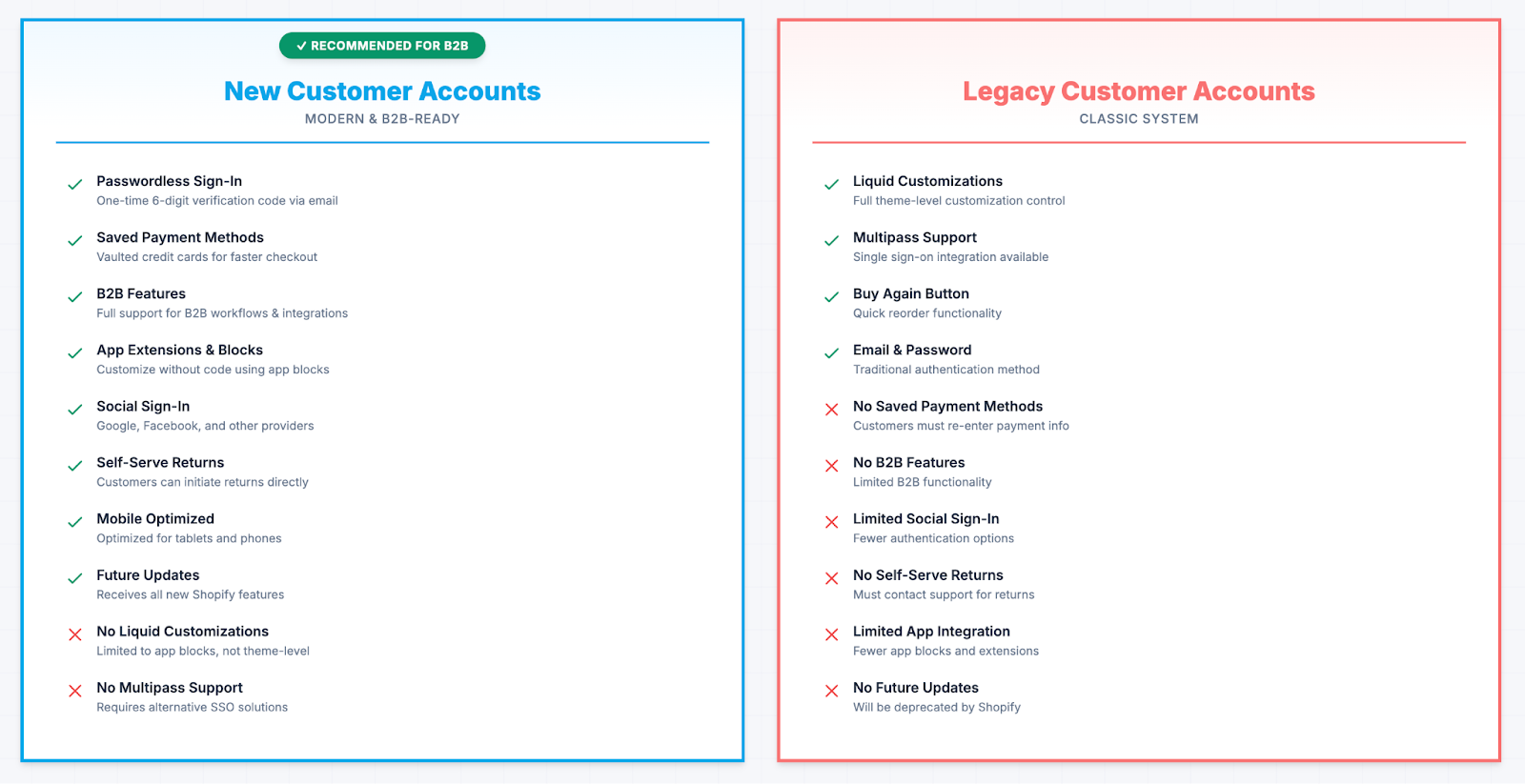
Pros of New Customer Accounts
Passwordless Sign-In:
Uses a one-time 6-digit verification code instead of passwords
Reduces password-related support issues
More secure than traditional password systems
Saved Payment Methods:
Customers can save payment methods for faster checkout
Reduces checkout friction for repeat B2B buyers
Supports vaulted credit cards for quick reordering
B2B Features and Integration:
Full support for B2B features
Better integration with B2B-specific apps and workflows
Supports account-specific pricing, payment terms, and customer segments
Social Sign-In:
Supports social sign-in options (Google, Facebook)
Provides additional authentication methods for customers
Can improve customer onboarding experience
Consistent Branding:
Uses checkout style branding for a consistent look across checkout and account pages
Maintains brand consistency throughout the customer journey
Not tied to online store theme, allowing independent branding
Self-Serve Returns:
Customers can initiate returns directly from their account
Reduces support workload for return requests
Improves customer experience for post-purchase needs
App Extensions and Blocks:
Supports app extensions and blocks for customization without code
Allows adding functionality through apps
Enables custom sections and features through the app ecosystem
Customer Account Menu Customization:
Customize the account menu to match your B2B needs
Add or remove menu items based on customer type
Create a tailored navigation experience
Customizable Account Pages
You can customize the account pages using app blocks, similar to how you customize checkout. This lets you:
Add custom sections for B2B-specific information
Display account-specific pricing tiers
Show order history with custom filters
Add links to important resources (catalogs, spec sheets, etc.)
Better App Integration
Apps can add blocks to customer account pages, making it easier to integrate:
Order management tools
Quote request systems
Account manager contact information
Custom pricing displays
Document libraries
Improved User Experience
The new system provides a more modern interface that's easier to navigate. Customers can:
See their order history more clearly
Manage saved addresses more easily
Update payment methods with less friction
Access account-specific information in one place
Mobile Optimization
The new Customer Accounts are optimized for mobile devices, which is important since many B2B buyers use tablets and phones to place orders.
Cons of New Customer Accounts
No Liquid Customizations:
Does not support Liquid customizations
Cannot use theme-level customization like legacy accounts
Customization is limited to app blocks and extensions
No Multipass Support:
Does not support Multipass for single sign-on
Cannot integrate with external authentication systems that use Multipass
May require alternative SSO solutions if needed
No Custom Domain Per Market:
Cannot set a custom domain per market for customer accounts pages
Limited flexibility for multi-market branding
All markets use the same customer account domain structure
Workflow Trigger Limitations:
Workflow triggers or automations based on legacy accounts are not supported
May need to update existing automations when migrating
Some third-party integrations may need adjustment
Legacy Customer Accounts
Legacy Customer Accounts are the older system. They still function, but they have limitations and won't receive new features.
Pros of Legacy Customer Accounts
Liquid Customizations:
Supports Liquid customizations, allowing more theme-level customization
Can modify account pages using Liquid templates
Greater control over the visual design and layout
Multipass Support:
Supports Multipass for single sign-on
Can integrate with external authentication systems
Useful for businesses with existing SSO infrastructure
Email and Password Sign-In:
Customers can sign in with email and password
Traditional authentication method that customers are familiar with
No need for verification codes
Buy Again Button:
Supports the Buy Again button for quick reordering
Helps customers quickly repurchase previous items
Improves repeat purchase experience
Cons of Legacy Customer Accounts
Password Management:
Customers must remember passwords
Password-related support issues are common
Security concerns with password-based authentication
No Saved Payment Methods:
Does not support saved payment methods
Customers must re-enter payment information each time
Increases checkout friction for repeat buyers
No B2B Features:
Does not support B2B features
Cannot leverage B2B-specific functionality
Limited for manufacturing and wholesale businesses
Limited Social Sign-In:
Limited support for social sign-in options
Fewer authentication methods available
May not meet modern customer expectations
Theme-Dependent Branding:
Branding is tied to the online store theme, not checkout style
Less flexibility for independent branding
May create inconsistent brand experience
No Self-Serve Returns:
Does not support self-serve returns
Customers must contact support for returns
Increases support workload
Limited Customization Options:
Cannot add custom sections or app blocks easily
Limited to basic styling options
Less flexibility for B2B-specific needs
Still Functional
Legacy accounts still work for basic needs:
Customer login
Order history
Address management
However, they lack modern features and won't receive updates from Shopify.
Key Differences for B2B
For B2B and manufacturing businesses, the new Customer Accounts system offers specific advantages:
Account-Specific Information
You can display account-specific information on customer account pages, such as:
Contract pricing
Credit limits
Payment terms
Assigned account manager
Approved product catalogs
Order Management
B2B customers often need better order management tools. The new system makes it easier to:
Filter orders by status, date, or product
View order details with custom information
Reorder previous orders
Track shipments
Quote and Draft Order Access
If you use quotes or draft orders, the new system can display these more clearly, making it easier for customers to convert quotes to orders or complete draft orders.
Multi-User Accounts
Some B2B businesses need multiple users per account. The new system provides better support for this, though you may still need apps for full multi-user functionality.
Third-Party Customer Account Apps
If you need more advanced customization than what Shopify's native customer accounts provide, several third-party apps can enhance your customer account experience. These apps work with both Classic and new Customer Accounts systems, offering additional features and customization options beyond what's available out of the box.
C:Hub Customer Accounts
C:Hub Customer Accounts replaces your store's default customer accounts with a fully customizable solution that brings everything into one place. Key features include:
Works with both systems: Seamlessly integrates with both Shopify Classic and new Customer Accounts
Order management: View orders, update profiles, cancel orders, pay now, and reorder items
Order tracking: Built-in order tracking functionality
Custom menus: Create custom navigation menus tailored to your B2B needs
Cross-device sync: Synchronizes across devices for consistent experience
These apps are particularly useful for B2B businesses that need:
Advanced order management beyond native features
Custom data collection and customer profiles
Integration with specific business tools or workflows
Enhanced loyalty or rewards programs
More sophisticated customization than app blocks provide
Additional features like returns, wishlists, or store credit
While Shopify's native customer accounts (both legacy and new) provide solid functionality, these third-party apps can help you create a more comprehensive customer account experience tailored to your specific B2B needs.
Migration Considerations
If you're currently using Legacy Customer Accounts, consider these factors before migrating:
Customer Data
Your existing customer data will migrate automatically. Orders, addresses, and payment methods will transfer to the new system. However, note that saved payment methods are not supported in legacy accounts, so customers will need to save their payment methods again after migration.
Customizations
If you've customized legacy account pages using Liquid, you'll need to rebuild those customizations using the new app block system. This might require development work, as Liquid customizations are not supported in the new system.
Multipass and SSO
If you use Multipass for single sign-on, you'll need to find an alternative solution. The new Customer Accounts system does not support Multipass, so you may need to implement a different SSO approach or work with Shopify to find a compatible solution.
Workflow Triggers and Automations
Workflow triggers or automations based on legacy accounts are not supported in the new system. Review your existing automations and update them to work with the new Customer Accounts system before migrating.
App Compatibility
Check if your apps support the new Customer Accounts system. Most modern apps do, but older apps might not. Verify that all critical functionality will continue to work after migration.
Custom Domains
If you use custom domains per market for customer accounts pages, note that this feature is not available in the new system. You'll need to adjust your multi-market strategy accordingly.
Testing
Test the new system thoroughly before switching. Create a test customer account and verify that all functionality works as expected. Test passwordless sign-in, saved payment methods, and any custom features you've implemented.
Which Should You Choose?
Choosing between Legacy and New Customer Accounts depends on your store's needs. Legacy accounts offer more theme customization and Multipass support, while new customer accounts provide a modern, passwordless experience with B2B and saved payment method support.
Choose New Customer Accounts if:
You serve B2B customers who need account-specific information
You want saved payment methods for faster checkout
You need B2B features and integrations
You want passwordless sign-in with verification codes
You need self-serve returns functionality
You want social sign-in options (Google, Facebook)
You prefer checkout-style branding consistency
You want to use app extensions and blocks for customization
You need mobile-optimized account pages
You want access to future Shopify features
Stay on Legacy Customer Accounts if:
You need Liquid customizations for theme-level control
You require Multipass for single sign-on integration
You need custom domains per market for customer accounts
You have workflow triggers or automations tied to legacy accounts
You prefer traditional email and password authentication
You need the Buy Again button functionality
Your apps don't support the new system yet
You're not ready to migrate and rebuild customizations
Important Considerations:
It's better to plan the migration now rather than being forced to do it later
Most B2B businesses benefit significantly from the new Customer Accounts system
If you rely on Liquid customizations or Multipass, you may need to find alternative solutions before migrating
Test thoroughly before switching to ensure all your workflows and integrations continue to function
How to Activate New Customer Accounts
Transitioning from legacy customer accounts to the new customer accounts system involves several key steps:
Step 1: Review and Prepare
Before switching, review your current setup:
Identify any apps or Liquid customizations on legacy customer account pages that won't carry over
Review workflow triggers or automations based on legacy accounts that need updating
If you use Multipass, plan for an alternative SSO solution
Step 2: Update Branding
Your checkout style branding automatically applies to new customer account pages. Review and update your checkout style in Settings > Checkout to ensure consistent branding across checkout and account pages.
Step 3: Duplicate Configuration
Duplicate your existing checkout and accounts configuration in your Shopify admin under Settings > Checkout. This allows you to safely customize and preview changes without affecting your live checkout experience.
Step 4: Customize with Apps
Use app extensions and blocks to add features and customize customer accounts pages. This replaces any legacy customizations you had. Plan which apps you'll use to rebuild functionality that existed in your legacy accounts.
Step 5: Update Domain (Optional)
Optionally, create a subdomain based on your primary domain to point to your customer account pages for a consistent experience. This helps maintain brand consistency and provides a seamless customer experience.
Step 6: Update Sender Email
Ensure your sender email is up to date in your Shopify settings. This optimizes email deliverability for account-related emails, including the passwordless sign-in codes that customers will receive.
Step 7: Switch to Customer Accounts
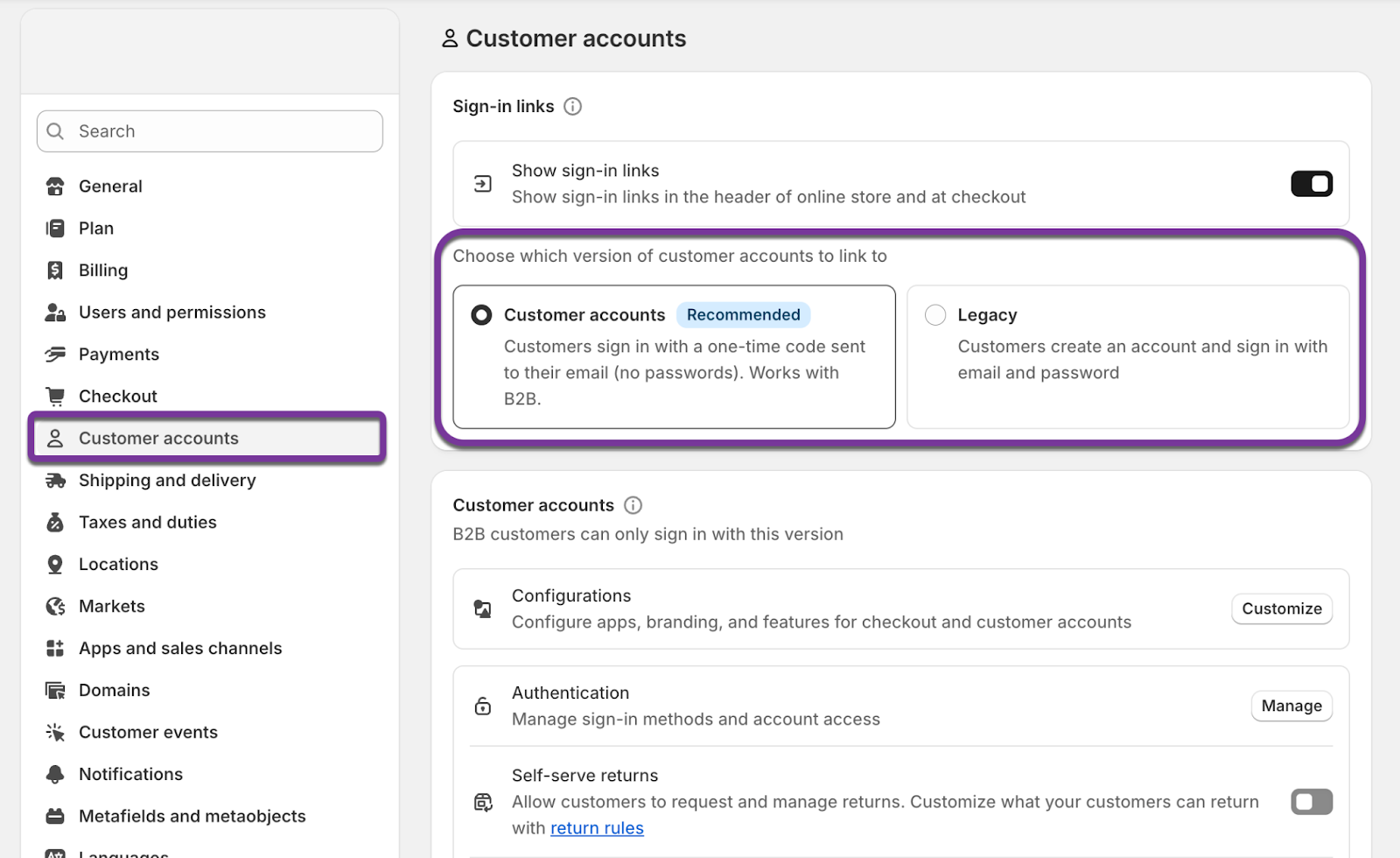
In your Shopify admin, navigate to Settings > Customer accounts. Select the new customer accounts option and switch.
After Switching
Once you've switched to the new Customer Accounts system:
Customers will use passwordless sign-in with a one-time code sent to their email
Existing customer profiles remain intact, so customers don't need to re-register
You can customize the account pages using app blocks from installed apps
You can switch back to legacy accounts anytime if needed
Important Note: You can switch back to legacy accounts anytime if needed, but keep in mind that Shopify will eventually deprecate legacy accounts, so it's best to complete the migration when you're ready.
Conclusion
For B2B and manufacturing businesses, the new Customer Accounts system is the better choice. It offers more customization, better app integration, and access to future features. While Legacy Customer Accounts still work, they're limited and won't receive updates.
If you're on Legacy Customer Accounts, plan your migration to the new system. The migration is straightforward, and the benefits for B2B businesses are significant. Take advantage of the customization options to create account pages that serve your customers' specific needs.
The new Customer Accounts system aligns with Shopify's direction and provides the flexibility B2B businesses need to create tailored experiences for their customers.


.jpg)
.png)

.png)
