Manufacturers running NetSuite as their ERP need their Shopify store to sync orders, inventory, customers, and products. The NetSuite Connector for Shopify handles this integration, synchronizing data between both systems so you can manage operations from NetSuite while selling through Shopify.
This guide covers how to set up the NetSuite-Shopify Connector, configure data synchronization, and handle common manufacturing and B2B scenarios.
What the Connector Does
The NetSuite Connector for Shopify synchronizes data bidirectionally between your systems.
Sync Capabilities
For manufacturers, this means orders flow into NetSuite for fulfillment, inventory stays accurate across channels, and B2B payment terms sync properly.
Prerequisites
Before starting setup, confirm these requirements.
NetSuite Requirements
Active NetSuite account with connector entitlement
Contact your NetSuite account manager to add the Shopify connector to your account
Administrator access to configure the connector
Shopify Requirements
Shopify store with admin access
Your Shopify shop name (the subdomain portion of your URL)
For B2B: Shopify B2B features configured with companies and catalogs
Access Requirements
The connector uses the FarApp platform (app.farapp.com) to manage the integration between NetSuite and Shopify.
Connecting Your Shopify Account
Follow these steps to establish the connection between NetSuite and Shopify.
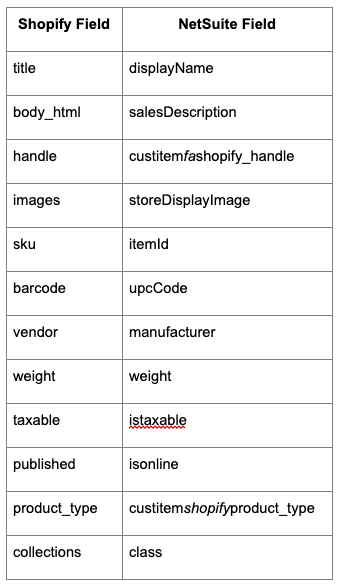
Products can sync bidirectionally, though most manufacturers push products from NetSuite to Shopify.
What Syncs
SKUs and item IDs
Titles and descriptions
Pricing
Images
Weight and dimensions
Product types and categories
Published status
Country of Origin and HS Codes
For international shipping compliance:
Map Country/region of origin to countrycodeof_origin
Map Harmonized System Code to harmonizedsystemcode
These fields support accurate customs documentation.
Channel Visibility
Configure the published_scope field:
global: Product visible on all channels
web: Visible on all channels except Point of Sale
Important Configuration Considerations
One Connector Per Store
Each Shopify connector connects to a single store. If you have multiple Shopify stores (separate retail and wholesale stores, for example), you need a separate connector for each.
Do not attempt to update an existing connector to point to a different shop. This causes errors. Instead, add a new connector for each additional store.
Wholesale Pricing Considerations
The connector syncs Shopify wholesale prices as discounts (showing regular price with a discount applied). If you prefer consistent pricing without discount display:
Create a separate Shopify store for wholesale customers
Add a dedicated connector for the wholesale store
This keeps pricing clean without visible discounts
For B2B orders where you want invoices (not cash sales):
Leave payment methods unmapped
Ensure payment methods aren't required in NetSuite
Orders will generate invoices rather than cash sale transactions
Known Limitations
Be aware of these connector limitations when planning your integration.
Plan your workflows around these limitations. For example, if you need to add handling fees or default items to orders, handle that in NetSuite after import rather than expecting the connector to add them.
Order Flow for Manufacturers
Here's how orders typically flow through the connected systems.
Standard Order Flow
Customer places order on Shopify
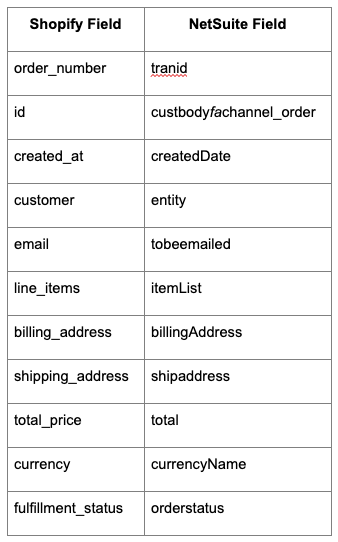
Connector syncs order to NetSuite as sales order
Warehouse fulfills from NetSuite
Fulfillment syncs back to Shopify with tracking
Customer receives shipment notification
B2B Order Flow
Business customer places order on Shopify with payment terms
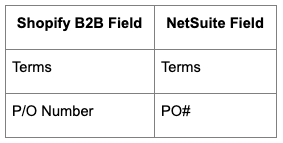
Connector syncs order with company and terms data
Sales order created in NetSuite (may be Pending Approval for deposits)
The NetSuite-Shopify Connector bridges your ERP and ecommerce operations, keeping orders, inventory, and customer data synchronized. For manufacturers with B2B sales, the connector's support for payment terms, company accounts, and invoice handling makes it particularly valuable for managing wholesale relationships alongside direct sales.


.png)
.png)
.png)

.png)
