


.png)
The most common reason an automation project goes over budget or over timeline is not a technical problem. It is a brief that was never written, or written so loosely that the developer had to guess at half the requirements.
A developer cannot automate a process they do not understand. If the scope document describes the outcome without describing the triggers, the data sources, the exception paths, and the business rules, the build will either stall in discovery or produce something that works under ideal conditions and fails the first time an edge case appears.
A well-written automation brief is not documentation. It is the build plan. Every section maps to a decision the developer makes when constructing the workflow. Missing sections produce guesses. Guesses produce rework.
This post covers the six sections every automation brief must contain, what goes wrong when each is missing, and what a complete brief looks like for a real workflow.
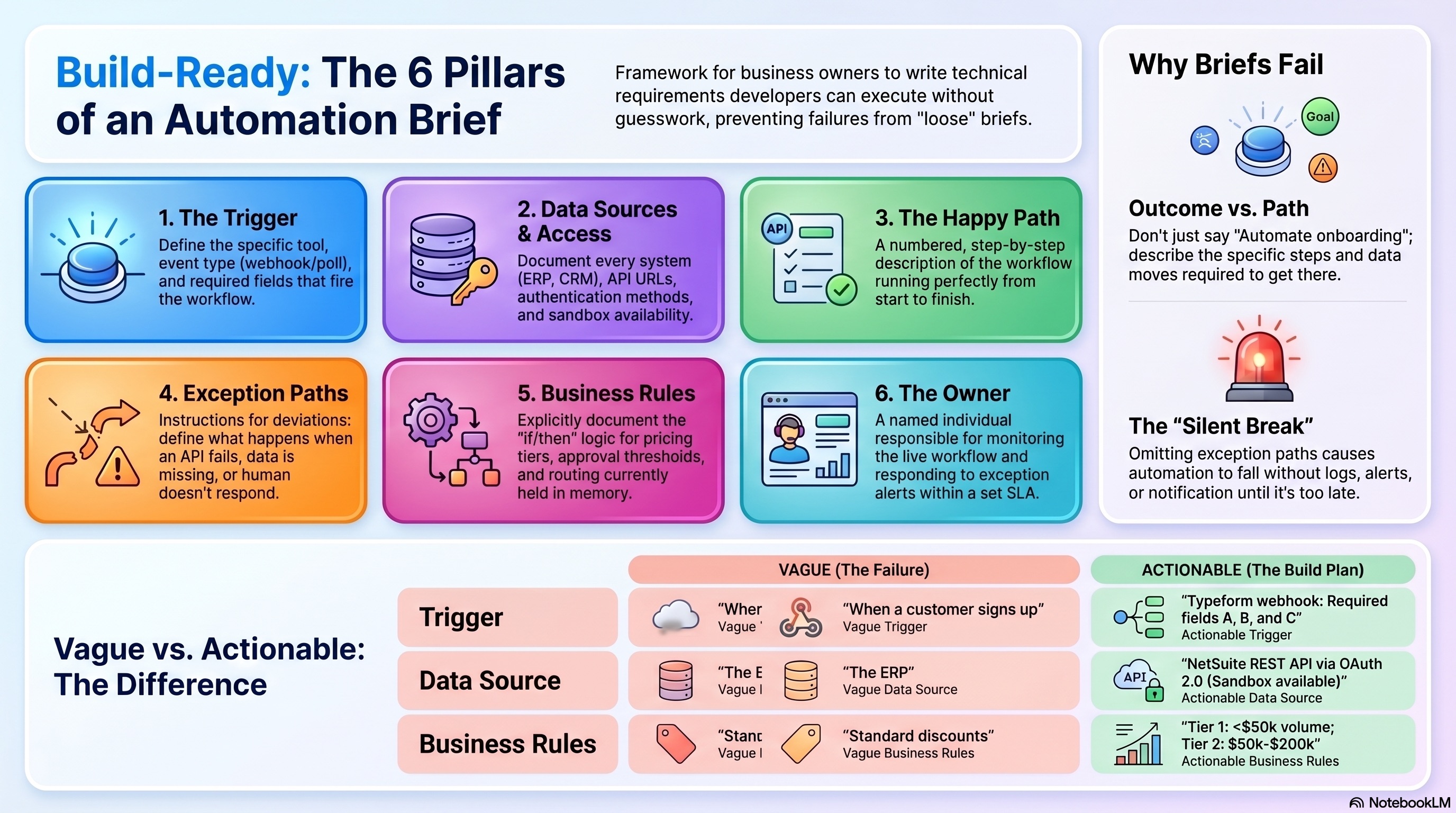
The most common brief failure is describing the outcome without describing the path. "Automate the customer onboarding process" is an outcome description. It tells the developer what the endpoint is but nothing about how the workflow starts, what data it needs, or what it should do when something goes wrong.
The second most common failure is omitting the exception paths entirely. Most briefs describe what happens when everything works correctly. Automation has to handle every case, including the ones that do not work correctly, or it will break silently the first time an exception appears in production.
The third failure is encoding unwritten business rules. If pricing tiers, credit limits, or approval thresholds exist in someone's memory rather than in a document, the automation will encode the wrong version of those rules, or the developer will spend the first three weeks of the engagement extracting them before any build work begins.
What it is: The specific event that starts the workflow. Not "when a new customer submits an application" but: which form, on which platform, with what fields required for the workflow to fire. Is the trigger a webhook, a scheduled poll, a database row insertion, or a CRM deal stage change?
What goes wrong if it is missing: The developer picks a trigger based on what seems logical. If they choose a webhook and you expected a scheduled trigger, the workflow fires at the wrong moment or not at all. The trigger determines everything downstream. It cannot be guessed.
What to write: Tool or system, specific event type, required fields in the payload, what happens if a required field is absent.
What it is: Every system the workflow reads from or writes to, and the access method for each one. Not "the ERP" but: which ERP, which endpoint, whether it has a documented REST API, who holds the credentials, and whether a sandbox environment exists for testing.
What goes wrong if it is missing: The integration scope gets dramatically underestimated. A system without a REST API may require a custom connector, a middleware layer, or a completely different architecture. Discovering this mid-build adds weeks and cost.
What to write: System name, API documentation URL if available, authentication method (API key, OAuth, basic auth), sandbox access details, and any rate limits or data access restrictions.
What it is: A numbered, step-by-step description of what happens when the workflow runs correctly, with no exceptions, no missing data, and no failed API calls. Each step should be specific enough that a developer can turn it into a node.
What goes wrong if it is missing: The developer builds the workflow they imagine the process looks like. If they are unfamiliar with your business, their mental model of your process will differ from the actual process in ways that become apparent only during testing.
What to write: A numbered list. "1. Form is submitted. 2. n8n receives the webhook payload. 3. n8n sends company name and address to credit API. 4. Credit API returns pass status. 5. n8n calls ERP API to create customer record." Continue through the end state.
What it is: What the workflow should do for every case that deviates from the happy path. Credit check returns review. A required field is missing from the form. The ERP API returns an error. The approval sits for more than 48 hours with no action.
What goes wrong if it is missing: The automation breaks silently on its first exception. There is no fallback, no alert, and no log entry. The edge case simply disappears into a failed execution and no one knows it happened until the affected customer, vendor, or internal team raises an issue.
What to write: List at least three to five exception scenarios relevant to the workflow. For each one, define: what triggers the exception, what the workflow should do (route to a human, send an alert, log and skip, retry), and who receives the alert if one is required.
What it is: The logic that governs decisions in the workflow. Pricing tiers, approval authority thresholds, credit limit structures, routing rules, discount schedules. The rules that currently live in someone's head or in an informal spreadsheet.
What goes wrong if it is missing: The developer either applies no logic (building a workflow that treats every account identically) or extracts the rules from the process owner during the build, consuming engagement time that was budgeted for development.
What to write: Every rule that affects a decision in the workflow. "Accounts with annual volume below $50,000 are assigned Tier 1. Accounts between $50,000 and $200,000 are assigned Tier 2. Accounts above $200,000 require manual review before tier assignment." Write the rule as it would appear in an IF statement.
What it is: One named person who is responsible for monitoring the workflow in production, responding to exception alerts, and escalating issues when the workflow breaks.
What goes wrong if it is missing: No one watches the workflow after it goes live. Errors accumulate in the execution log unnoticed. Failed runs sit without resolution. The automation degrades quietly until it fails on a high-stakes account and someone discovers it has been broken for three weeks.
What to write: Full name, role, response SLA for exception alerts (same day, within 4 hours, etc.), and who they escalate to if the issue requires developer involvement.
Here is what a complete brief looks like for the customer onboarding workflow described in Monday's post.
Trigger: Web form submission via Typeform. Webhook URL delivered to n8n. Required fields: company name, billing address, contact name, contact email, account type (dropdown: Distributor / OEM / Direct). If any required field is missing, the workflow should send a follow-up email to the contact requesting the missing information and halt until resubmitted.
Data sources:
Happy path:
Exception paths:
Business rules:
Owner: Jane Caldwell, Operations Coordinator. Response SLA for exception alerts: same business day. Escalation: Mark Torres, VP Operations.
Write a brief for your highest-priority workflow using the six sections above before any vendor or developer conversation begins. Use it as the basis for scoping discussions. A developer who receives a complete brief can estimate the build accurately. A developer who receives an outcome description will ask questions for the first two weeks and estimate loosely.
If you get stuck on the exception paths or business rules, that gap is worth fixing before the build starts. An automation brief that cannot describe what happens when things go wrong is describing a workflow that has not been thought through completely. The developer will encounter those cases in production regardless.

.png)
