

.png)
Every n8n ERP integration attempt by a manufacturing team hits the same wall: n8n ships with native connectors for Salesforce, HubSpot, Google Sheets, and Slack, but not for NetSuite, Acumatica, Dynamics 365, Epicor, SYSPRO, or most of the ERPs mid-market manufacturers actually run.
This means every time someone searches "n8n NetSuite integration" or "n8n Acumatica connector," the first instinct is to look for a plugin that does not exist, then conclude that n8n cannot connect to their ERP.
It can. The HTTP Request node is the universal connector. Any ERP with a REST API can be connected to n8n. This post walks through how to do it for the ERPs most commonly used in manufacturing environments.
Every modern ERP exposes a REST API. The API accepts HTTP requests in one of two forms:
The n8n HTTP Request node makes these calls. You configure the URL, the authentication method, the request body if needed, and n8n handles the rest. The output is a JSON response from the ERP that you can map to any downstream step in your workflow.
This is functionally identical to what a native connector does. A native connector is just a pre-built HTTP Request node with a friendly UI on top. You lose the UI convenience, but you gain the ability to access any endpoint the ERP exposes, not just the ones a connector vendor decided to support.
The URL structure and request format for each ERP are documented in their developer docs. The part that requires more attention is authentication. Different ERPs use different methods.
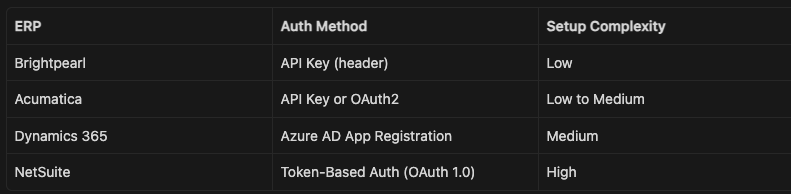
The simplest. Your ERP admin generates an API key from the admin console and you pass it in every request header.
In n8n:
X-API-Key: your-key-here or Authorization: Bearer your-key-here)Used by: Brightpearl, some Acumatica configurations, some custom ERP implementations.
Used when the ERP manages access tokens that expire. Your application gets a client ID and client secret, exchanges them for an access token, and includes that token in every subsequent request.
In n8n:
n8n handles the token exchange and refresh automatically once the credential is configured.
Used by: Microsoft Dynamics 365, some Acumatica environments, Salesforce.
NetSuite uses a custom OAuth 1.0-based system called Token-Based Authentication. It requires four credentials: consumer key, consumer secret, token ID, and token secret.
In n8n:
The OAuth 1.0 signature generation requires computing an HMAC-SHA256 hash of the request parameters combined with your credentials. This is approximately 20 lines of JavaScript in an n8n Code node. Starter implementations are available in the n8n community forum and the n8n template library, searchable by "NetSuite TBA."
Alternatively, if your NetSuite account has SuiteQL access enabled, you can also query NetSuite using the SuiteQL REST endpoint which uses the same TBA credentials but returns SQL-queryable results, making it easier to pull exactly the data you need in one request.
Microsoft Dynamics 365 Business Central and Dynamics 365 Finance use Azure Active Directory for authentication.
Setup:
In n8n:
https://login.microsoftonline.com/{your-tenant-id}/oauth2/v2.0/tokenhttps://api.businesscentral.dynamics.com/.default (for Business Central) or the equivalent for your Dynamics moduleOnce configured, the HTTP Request node uses this credential and handles token refresh automatically.
This example pulls inventory data from an ERP via its REST API and sends a Slack alert when any SKU drops below its reorder point. It works regardless of which ERP you use as the source, as long as you substitute the correct endpoint URL and authentication method.
Add a Schedule Trigger node. Set it to run every hour, or at whatever interval your ERP inventory data refreshes.
Add an HTTP Request node.
Endpoint examples by ERP:
NetSuite SuiteQL:
POST https://{accountId}.suitetalk.api.netsuite.com/services/rest/query/v1/suiteql
Body: {"q": "SELECT item, quantityonhand, reorderpoint FROM inventoryitem WHERE quantityonhand <= reorderpoint"}
Acumatica (field names vary by API version and site configuration; verify against your instance's OData metadata at /entity/Default/{version}/$metadata):
GET https://{yourinstance}.acumatica.com/entity/Default/22.200.001/StockItem?$filter=AvailableForShipment le ReorderPoint&$select=InventoryID,Description,AvailableForShipment,ReorderPoint
Dynamics 365 Business Central (the reorderPoint field requires Inventory Management to be configured in BC; confirm field availability in your environment before filtering):
GET https://api.businesscentral.dynamics.com/v2.0/{tenant}/{env}/api/v2.0/companies({companyId})/items?$filter=inventory lt reorderPoint&$select=number,displayName,inventory,reorderPoint
For ERPs without a direct query-by-condition endpoint, pull all items and filter in the next step.
Add a Code node to filter the response to only SKUs below reorder point, and to format the output for the Slack message.
const items = $input.all();
const lowStock = [];

for (const item of items) {
  const onHand = item.json.quantityonhand ?? item.json.inventory ?? 0;
  const rop = item.json.reorderpoint ?? item.json.reorderPoint ?? 0;

  if (onHand <= rop) {
    lowStock.push({
      sku: item.json.item ?? item.json.number,
      name: item.json.description ?? item.json.displayName,
      onHand,
      rop
    });
  }
}

return lowStock.map(item => ({ json: item }));Add an IF node with condition: {{ $input.all().length > 0 }}
Add a Slack node on the true branch.
*Low Inventory Alert*
{{ $input.all().length }} SKU(s) below reorder point:
{{ $input.all().map(i => `• ${i.json.sku}: ${i.json.name}, ${i.json.onHand} on hand (ROP: ${i.json.rop})`).join('\n') }}
This sends a single Slack message listing all affected SKUs rather than one message per SKU, which keeps the channel clean.
Most ERPs impose rate limits on API calls. Common limits:
For batch workflows pulling large item lists, add a Wait node between paginated requests if you are processing more than a few hundred records per run. For polling workflows that run hourly, rate limits are rarely an issue.
If you receive a 429 (Too Many Requests) response, add error handling to your HTTP Request node: set the "On Error" option to "Retry" with a 2-second delay and 3 max retries. n8n's built-in retry handles most transient rate limit responses without any additional logic.
In some environments, the ERP is behind a firewall with no inbound internet access, or the IT policy restricts direct API access from external services. In these cases, you cannot connect n8n directly to the ERP.
Two options:
Option A: n8n self-hosted on your internal network. If n8n is running on a server inside your network, it can reach internal ERP endpoints without any firewall exceptions. The n8n instance still connects outbound to Slack, email, and other external services.
Option B: Scheduled data export to a relay table. The ERP exports a nightly or hourly CSV or database dump to an accessible location (S3, SFTP, a shared database). n8n reads from the relay rather than hitting the ERP directly. This adds latency but works in any network environment and does not require ERP API credentials.
For manufacturing teams building a Retool ops dashboard that needs live ERP data, Option A is the cleanest path. See How to Build a Manufacturing Operations Dashboard with Retool for how to combine the n8n relay with a Retool interface that lets your ops team take action from the same screen.
Most ERPs also support outbound webhooks or event subscriptions, meaning the ERP can call your n8n workflow when something happens rather than waiting for n8n to poll.
Event-driven triggers are more responsive than polling for time-sensitive workflows: a PO approval that needs to happen within minutes of a buyer submitting the request, or a quality hold notification that needs to reach the supervisor immediately.
For most inventory and reporting workflows, hourly polling is sufficient. For approval routing and exception alerts, set up webhook triggers if your ERP supports them.
The Flow Kaizen guide covers which ERP integration patterns to prioritize across your operation, including the workflows that deliver the fastest return and how to sequence them when you are starting from scratch.

.png)
