

.png)
Every manufacturer running a purchasing department already does three-way matching, whether or not anyone calls it that. It's the check that happens before a vendor invoice gets approved for payment: does what we ordered, what we received, and what we're being billed for actually agree.
The concept isn't complicated. Doing it by hand, at volume, across a growing number of vendors, is what makes it painful. This post covers what three-way matching actually checks, why it exists, the variance types that cause most mismatches, and how to automate the comparison so your AP team is reviewing exceptions instead of re-checking every invoice from scratch.
Three-way matching compares three documents before an invoice is approved for payment:
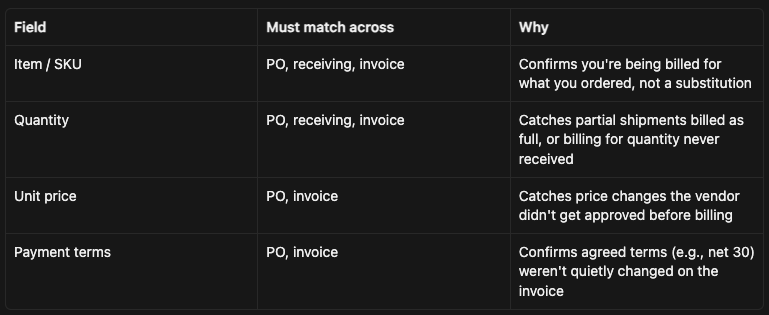
If all three documents agree within an acceptable tolerance, the invoice is approved for payment. If they don't, it's flagged as an exception for someone to investigate before payment goes out.
Two-way matching only compares the PO and the invoice, skipping the receiving confirmation. It's typically used for non-PO spend or services where there's nothing physical to receive (a consulting invoice, a software subscription). Manufacturers buying physical materials and components almost always need the three-way version, because the receiving record is what confirms you actually got what you're being billed for, not just that someone agreed to buy it.
Three-way matching isn't paperwork for its own sake. It's the control that catches:
Skipping this check doesn't just risk one bad payment. At volume, a manufacturer processing hundreds of invoices a month without consistent matching is effectively trusting every vendor's invoice at face value, every time.
The steps themselves aren't hard. The problem is that the three documents usually live in three different places:
For a manufacturer processing even a moderate invoice volume, this adds up to a meaningful chunk of AP's week spent on document retrieval and manual comparison rather than actually resolving the exceptions that need a human decision.
Most matching exceptions fall into a small number of repeatable categories:
Recognizing which category an exception falls into is most of the work of resolving it quickly. A quantity variance and a price variance need entirely different follow-up (checking with the warehouse vs. checking with purchasing), so routing exceptions to the right category from the start saves the back-and-forth of figuring out who needs to look at it.
Not every discrepancy needs a human to look at it. A $0.02 rounding difference or a fractional unit-of-measure conversion artifact isn't worth AP's time to investigate manually every single time it happens.
Most manufacturers set a tolerance band, for example:
Setting sensible tolerances is what turns three-way matching from "review every invoice" into "review only the invoices that actually need a decision." The right thresholds depend on your typical order size and vendor reliability; start conservative and loosen them as you confirm what's actually low-risk in practice.
The matching logic itself is a good fit for automation, because it's a repeatable comparison against a defined tolerance, not a judgment call for the majority of invoices.
A typical n8n workflow for this:
This doesn't require replacing your ERP or buying a dedicated AP automation platform. It's a workflow layered on top of the systems you already use to issue POs, log receiving, and receive vendor invoices. See How to Automate Purchase Order Approvals in n8n for the upstream half of this process (getting the PO approved and issued in the first place), and How to Automate Invoice Processing in n8n for the invoice-parsing piece that feeds the matching workflow.
For the broader picture of where three-way matching fits into the full purchase-to-pay cycle, see Procurement Automation for Manufacturers: The Full Purchase-to-Pay Cycle. And for the accounts payable side more broadly, see AP Automation for Manufacturers: How to Do It Without Buying a New Platform.
The Flow Kaizen guide covers how to build the matching, exception-routing, and approval workflows above using n8n, without needing to license a new AP platform to get there.

.png)
